

Feature first published in the May/June 2021 issue of 3D ADEPT Mag. The contributors’ roles and software offerings refer to the time of this interview.
Finding a design that works first, predicting what’s happening inside the AM machine then.
The last time I was at a trade fair – before the pandemic hit – I stopped at a booth because a beautiful metal 3D printed part caught my eye. I was looking at it without any idea of what it really took to make it when I heard someone behind my back say: “the power of Finite Element Analysis”. I wasn’t sure to understand what it meant. I wasn’t sure either that the editor in me wanted to discuss a very technical topic that would have probably taken a lot of time to understand. So, I smiled, and I laid my eyes on something else.
That phrase led me to explore finite element analysis (FEA), a numerical method that helps predict the behaviour of parts and processes. To understand its uses in additive manufacturing, I invited software provider Ansys and on-demand manufacturing service Xometry to share their expertise.
This article aims to:
- Shed light on the main uses of FEA in an additive manufacturing production environment and how theory might differ from its practical aspect;
- Present its advantages and complexities in a given AM process: the specific cases of metal AM and FDM will be taken into account here;
- Provide tips to those who will leverage this tool in their work
Finite Element Analysis: What? Who? Why?
FEA divides a domain into elements connected at nodes to calculate an approximation of its behaviour. It draws on older mathematical methods, but its modern form developed in the twentieth century alongside numerical computing. The original text’s attribution to Euler in the sixteenth century was incorrect: Euler lived in the eighteenth century.

Brent Stucker, Distinguished Engineer in Additive Manufacturing at Ansys at the time of the interview, recalls the formulation and calculation work previously required. In a linear-mechanics example, element equations are assembled into a global stiffness system and solved with the loads and boundary conditions. Other analyses, including thermal, transient or nonlinear cases, require appropriate formulations.
With the advancement of software tools, the FEA method is more “automated” today. “The user might not require such calculations because the simulation tools are much more intuitive. They can use machine learning. So a non-expert can still have good results”, Stucker notes.
Software facilitates model creation, meshing and solution. Users still need to choose material properties and boundary conditions, check mesh convergence and interpret results. FEA does not itself require machine learning, and an intuitive interface does not guarantee a valid model.
Designing the part or simulating its manufacture?
However, the understanding and the main uses of this method remain quite confusing for most professionals today. For Stucker, professionals should make a clear distinction between two separate uses of FEA, especially when it comes to the AM process:
“It’s essential to distinguish between using FEA for the design of the component and on the other hand, to predict what’s going to happen to that design while it’s being built in the AM process. There are the two separate uses of the FEA process that people sometimes, confuse; and one uses two completely different types of FEA for these two problems.”
For design, analysis examines a part’s response to its operating conditions: geometry, material, loads, displacements and supports. Process simulation may instead predict temperatures, residual stresses or distortion during manufacturing. These objectives require different models and input data.
By combining these two main uses of FEA, Greg Paulsen, Director of Application Engineering at Xometry explains:
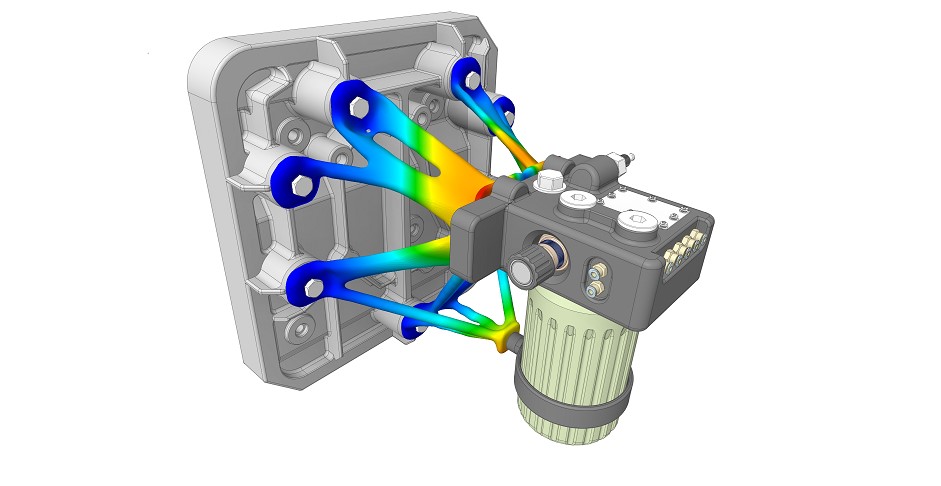
“FEA helps prove out your design will do what you say it will do in a digital space. Finite Element Analysis is a tool to help predict the results of a design’s performance before any physical part gets fabricated. Its advantage is that you can simulate, iterate, and validate your design’s “digital twin” without sinking time and cost into manufacturing and mechanical testing. FEA works by assigning material properties to a 3D model as well as environmental conditions and loads.
The simulation takes all of these into account to predict if those conditions affect the part’s structure integrity, even predicting deformation or critical stress points. Based on FEA feedback, you can modify your design to mitigate these effects or increase a safety factor. Ideally, FEA will help create the intended outcome and performance of your design so that when you build the part, you and your team have data-driven confidence that it will work”.
Such simulations can reduce physical iterations, but they do not automatically replace the validation or qualification tests required by the application. A finite element model, even when called a “digital twin” in the interview, does not by itself constitute a twin connected to a real part or process.
Who (can use it) & Why?
Listening to what the FEA method is, might give the illusion that the process is only intended to designers, but Ansys’ Stucker points out that in the end, the “main goals of running FEA depend upon your job description.” In other terms, whether you are a designer, an operator, a material scientist, or a quality engineer, you might find yourself leverage an FEA method in one of your tasks.
“As a designer, it’s for making an optimum design that actually performs as intended. As a machine operator it is to avoid build failure, minimize post-processing costs, maximize machine productivity and achieve part tolerances. As a material scientist it is to ensure the material microstructure is correct, etc. There are many people who can use FEA to make their AM operations better”, Stucker notes.
No matter what your job description is, the expert ensures that “running FEA can be as easy as using an Excel spreadsheet. For many types of AM simulations, the workflow has been standardized and simplified such that a user without any specialized FEA training can set up a simulation in a couple of minutes”.
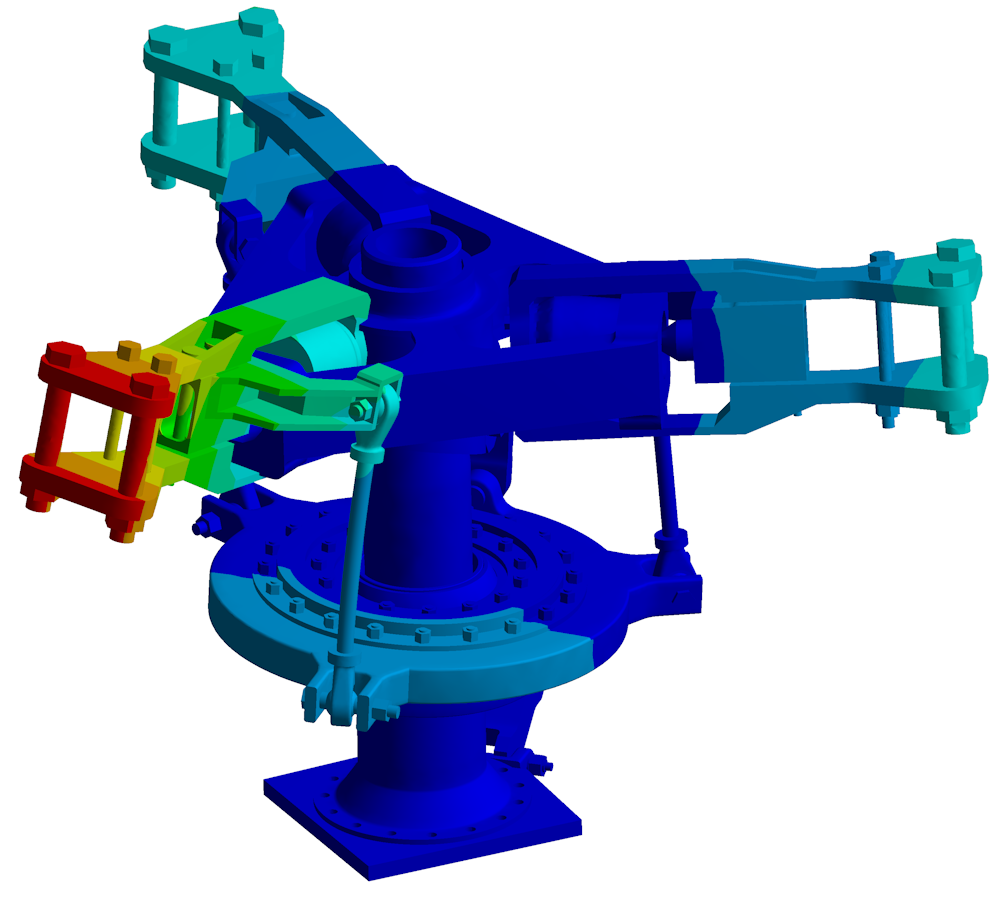
FEA, a few of the complexities explained during the product development cycle
FEA tools may be integrated into CAD software or used in a specialised environment. CAD integration facilitates geometry exchange without eliminating modelling work.
Here is the thing, as the use of FEA greatly depends on the professional’s job description, we came to realize that complexities during the analysis can greatly vary from one person to another and even on the applications.
Problems addressed include structural mechanics, heat transfer and, depending on the formulation, fluid flow. They can concern both a component’s operation and its manufacture.
A closer look at heat transfer for instance, reveals that FEA might be particularly useful when seeking to control thermal issues in a machine. Ansys’ expert states that the first thing to note is that one may not want the thermal characteristics to be the same for every region of a part.
“It may be beneficial to change the thermal characteristics locally, thus producing varying microstructures and properties in different regions of a part to optimize the part’s performance. To manage thermal issues, you must control both the heat input and the heat output. Heat input can be controlled by changing the machine energy inputs like laser power, scan speed, heater temperatures, etc. Typically heat output is changed by things like adding delays to increase cooling time, adding thermal supports and heat sinks, using active cooling in the chamber, etc.”, he continues.
Mesh choice, adaptation and error estimation affect accuracy and computation time. Useful results require explicit assumptions and verification appropriate to the phenomenon studied.
As Stucker notes, there are many other problems that FEA can help one with, like semiconductor chip design, manufacturing process optimization, and more. The question is, if you are new to the field and you do not have some of the “newer FEA packages, like Ansys Discovery, which make FEA easy, intuitive and almost instantaneous”, can this method slow down the product development cycle? We have asked this question to Xometry:
“Deciding on the inputs critical to your design’s success can often be time-consuming because those can be conditions outside of your control and require research. Most designers are working with a general understanding of the process and materials they are using to get a good start on the design approach. With additive manufacturing, you have access to rapid prototyping services with lower costs and short lead times. You can work in parallel by building physical products and defining the simulation to help validate other design features outside of the FEA’s goal. What is very compelling is how 3D design software blends design and FEA through a generative design process. Generative design takes advantage of the complexity level a 3D printed part can have and builds features around similar constraints used in FEA without the need for the part to be traditionally designed. Part features digitally form and connect based on FEA inputs. Compared to using a generative design approach, traditional FEA can be compared to using a road atlas for driving versus a navigation app–it is a step-change in functionality. Results of generative design simulations can turn into the actual part used or a template used by the designer to optimize for their intended manufacturing outcome.
FEA, from our experience, does not slow the Production Development Cycle down but allows engineering teams to contemplate and delve into deeper root failure issues/experiments before releasing the end-product. They are no longer looking at the surface level failures of the traditional it1, it2, or it3 as FEA has quick situational analysis feedback. This now allows the engineering team more time to push the boundary of product capability.”
FEA, a look at the manufacturing processes: the specific cases of metal AM and FDM
Sometimes, even when your primary intention is not to compare AM processes and conventional manufacturing processes, you find yourself realizing how conventional manufacturing principles continue to influence additive manufacturing production.
A finite element model can use isotropic or anisotropic material laws. Isotropy means that the property considered does not depend on direction; an orthotropic material has three principal directions with distinct properties. Additive manufacturing does not make every part systematically orthotropic or weaker: this depends on material, process, orientation and treatments, among other factors.
That’s why, whether you manufacture with a metal AM or an FDM 3D printing process, you may be required to consider minimum manufacturing feature size, orientation effects, need for supports, and other machine-specific and material-specific characteristics.
The following table distinguishes design analysis from manufacturing simulation. It clarifies the interview’s comparison for metal fusion processes and fused deposition modelling (FDM).
| FEA use | Metal fusion AM | FDM | Checks required |
|---|---|---|---|
| Part design | Model loads, supports and measured metal properties; include anisotropy where relevant. | Account for bead orientation, infill and interlayer behaviour. | Use material laws characterised for the process and treatment. A weakest-direction value does not describe every loading state. |
| Manufacturing simulation | Represent heat input, cooling, stresses and distortion for the chosen process. | Represent deposition, cooling and interlayer interactions as required by the model. | Choose spatial and time resolution, then validate results. Models and compensation methods do not transfer automatically between processes. |
Real cases then require a level of detail suited to the objectives, materials and computational constraints.
In Paulsen’s experience, “designing for 3D printed metal parts often favors the opposite drivers of design for machining. For example, CNC parts often retain thick, bulky features where a direct metal laser sintered (DMLS) part is best designed using thinner, more organic features. Some of these features may even be impossible to produce traditionally, such as lattice structures and curved internal channels. When simulating a part designed for DMLS, it may be difficult on the setup and more time-consuming during computation due to the extensive mesh data associated with highly complex parts.
[On the other hand], FDM parts can be significantly weaker in one direction due to the build orientation used. FDM may be better represented as a series of wafers with the thickness of the layer height having the planar (stronger) properties with an adhesive bond between each layer representing the vertical (weaker) properties. That is easy to write but can be challenging to do in practice.
In many cases, FDM 3D printed parts can be intended to deform, unlike many metal structures that may require stability. Certain metamaterial applications can be achieved with flexible polymer lattices. A great example is creating digital foams, where an elastomer is built using different densities of lattice to create softer or firmer behavior upon pressure.”
The “adhesive bond” here is a modelling analogy for interlayer interfaces, not the addition of glue in FDM. Actual bonding depends on fusion, contact and the beads’ thermal history. Whether a component should be rigid or deformable depends on its application, not simply on whether it is metal or polymer.
So, what else?
At first glance, FEA sounds very complex to understand and thus to leverage, but when you start scratching the surface, you feel the need to dig deeper and deeper and you realize that FEA upgrades as well as latest advancements in the field from software providers might fill an entire magazine.
Interfaces and workflows have broadened access to simulation. Depending on their function, tools support design, build preparation, material studies or quality. They do not remove the need for appropriate training, material characterisation or the evidence required to qualify a part.
However, as far as FEA is concerned, Ansys is specifically “looking at significantly simplifying our workflows, and expanding the types of machines and materials that [one] can simulate”.
From a user perspective, FEA is just one of the many tools that can be used by engineers across vertical industries adopting AM technologies and service bureaus. From that standpoint, Xometry’s Paulsen lays emphasis on the fact that additive manufacturing tools for CAD, FEA, and generative design software are still lacking or difficult to access, despite the significant improvements.
“Building tools to help define orientation, having an updated library with industry-agreed properties of different 3D printed materials and processes, and simplifying the process will all help. It is important to note that additive manufacturing can produce parts on demand with instant quoting at any time. FEA and similar tools can often aid in engineers getting the most out of the process for high-performance, weight reduction, part consolidation, and more”, he adds.
Last but not least, it should be noted that “not all parts require FEA or complex digital simulation. When they do, that is performed by the designer or engineer using the “digital twin” methods to produce and iterate without the physical production.”
An on-demand manufacturing service can support process selection and production. Uploading a file for a quote does not remove the design, validation and inspection requirements to be agreed with the manufacturer. Further reading: the Open University’s basic principles and Ansys’s FEA overview.
This exclusive feature has first been published in the May/June edition of 3D ADEPT Mag.
THE 3D ADEPT WEEKLY NEWSLETTER
The industry moves fast. Stay ahead.
Every week, the latest additive manufacturing news, in-depth features and real-world applications, straight to your inbox. Plus, be the first to know when a new issue of 3D ADEPT Mag is out.
Free · One email a week · Unsubscribe anytime
Clicking loads our email provider’s sign-up form, including its analytics and Google’s anti-bot protection. You’re only subscribed if you complete the sign-up. Read our privacy policy.